
Email Forwarding Service
(OUTBOUND) SMTP Server Settings
|
|
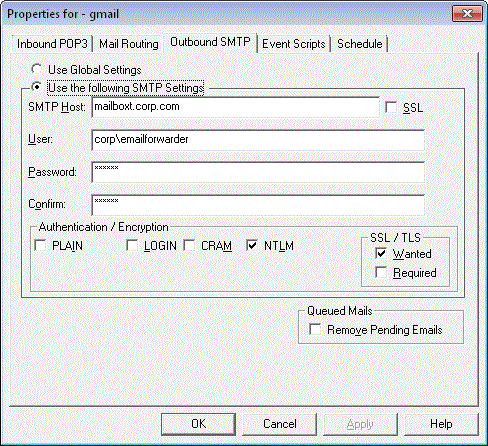
This property tab is used to
configure all standard SMTP settings for the connector.
By default, the GLOBAL SMTP Connector settings will be used.
Outbound:
|
SMTP Host: |
Specify the
hostname or the IP address of the SMTP Server. By default, the service will connect
to port 25 (smtp), if you want co connect to an alternative port - specify
the port number after a colon, as "server:port". (See SSL for more information) |
|
SSL |
If the
SMTP
server requires SSL/TLS immediately in the authentication state when the
connection is established, tick SSL after the host name. If this
box is ticked, and SSL/TLS can't be established, then the service will
disconnect from the server. For SMTP typically port 465 is used for SSL
connections. No data will be sent or received until encryption has been
enabled. |
|
User: |
(Optional) Set user
name used to log on to the SMTP Server. |
|
Password: |
(Optional) Specify the
user name used to log on to the SMTP Server. |
Authentication/Encryption:
A SMTP server can
support many different protocols for authenticating the user. Some are secure,
using encrypted secrets/password. Some are less secure using obscured but not
encrypted username/password and some are completely unsecured with
username/password being sent in the clear. Poprep supports the most
popular protocols used to connect to a SMTP Server. It also gives you full
control over what protocol can be used to authenticate to a particular server.
For some of these protocols Poprep takes advantage of native Windows
API's hence it's important that you run poprep on a supported operating system.
Poprep has been tested under Windows 2000, 2003, XP, Vista and 2008.
Poprep can also detect if SSL/TLS is
supported, and if it is to switch to an encrypted connection BEFORE it
authenticates the user.
Protocol Detection, the SMTP server must support EHLO if you are to use an
authentication protocol or SSL/TLS Encryption.
If you have entered a Username/Password then you
also have to
select at least one authentication method. If you enable many, or all protocols, Poprep
will first attempt to use a more secure protocol, and if that fails it will fall
back towards the less secure protocols. If one protocol fails, Poprep may
disconnect from the server, and then reconnect trying one of the less secure
protocols. in this situation, it's better to disable the protocol that can't be
used, saving the time it takes to reconnect to the server.
Authentication Protocols:
PLAIN
(Clear Text) |
Nearly all
SMTP servers support this
authentication protocol. Both the username and the Password is obscured,
making it
a bit mode difficult to see them for the novice. But they are NOT
encrypted, so any one that know how to can very easily convert them back
to clear text. |
|
LOGIN |
The Username
and Password is obscured before it's sent to the SMTP Server, making it
a bit mode difficult to see them for the novice. But they are NOT
encrypted, so any one that know how to can very easily convert them back
to clear text. |
|
CRAM (CRAM-MD5) |
The Username is
obscured and the Password and a random string sent from the SMTP Server is hashed using MD5
and sent back to the server. - More secure that PLAIN and LOGIN. |
|
NTLM |
Reasonably secure. This is the
same authentication mechanism as Microsoft are using between Windows/NT
Systems. |
SSL/TLS Encryption:
|
WANTED |
Use encryption if supported by the server.
If not supported, or if we failed to enable encryption, we will continue
to log on and send messages to the server. |
|
REQUIRED |
We will attempt to negotiate a SSL/TLS
connection with the POP3 server. If encryption isn't supported, of if we
failed to enable encryption, we will disconnect from the Server. |
Queued Mails
|
Remove Pending Emails |
If enabled, any queued message that has not yet
been delivered will be purged/deleted. The queue will be only be purged if the
connector is enabled and the service is running.
This option is automatically disabled once the purge completed. |